Unbound workflows vs. Agents on their own
Published · Last reviewed
- You set the stepsAn Unbound workflow is a fixed line of AI agents. You choose the steps, the agent for each one, and who checks the work.
- The harness runs themThe harness, not a model, starts each next step and hands on the work, in the order you set.
- Nothing goes missingEvery run completes every step or stops with a reason. A step or a review can’t quietly disappear the way it can when agents decide for themselves when to hand off.
Why self-directed handoffs miss steps
Many agent products let the agents coordinate themselves. Grok Bot, for example, lets Bots coordinate in parallel and hand work off through a shared computer, shared files, and messages. That is flexible, but it puts the plan inside the model’s reasoning. On every run, an agent decides what the steps are, what order they go in, when its part is done, and whether to pass the work on.
When the plan lives in the model, a multistep process can break in quiet ways:
- A step looks finished, so it gets marked done before it is.
- A review never happens, because nothing makes an agent ask for one.
- Work goes to the wrong agent, or is never handed on at all.
- The plan changes from run to run, so the same request gives different results.
- A stuck agent waits silently, and nobody notices until the result never arrives.
None of this needs a bad model. It comes from asking one model to be both the worker and the project manager.
How an Unbound workflow runs
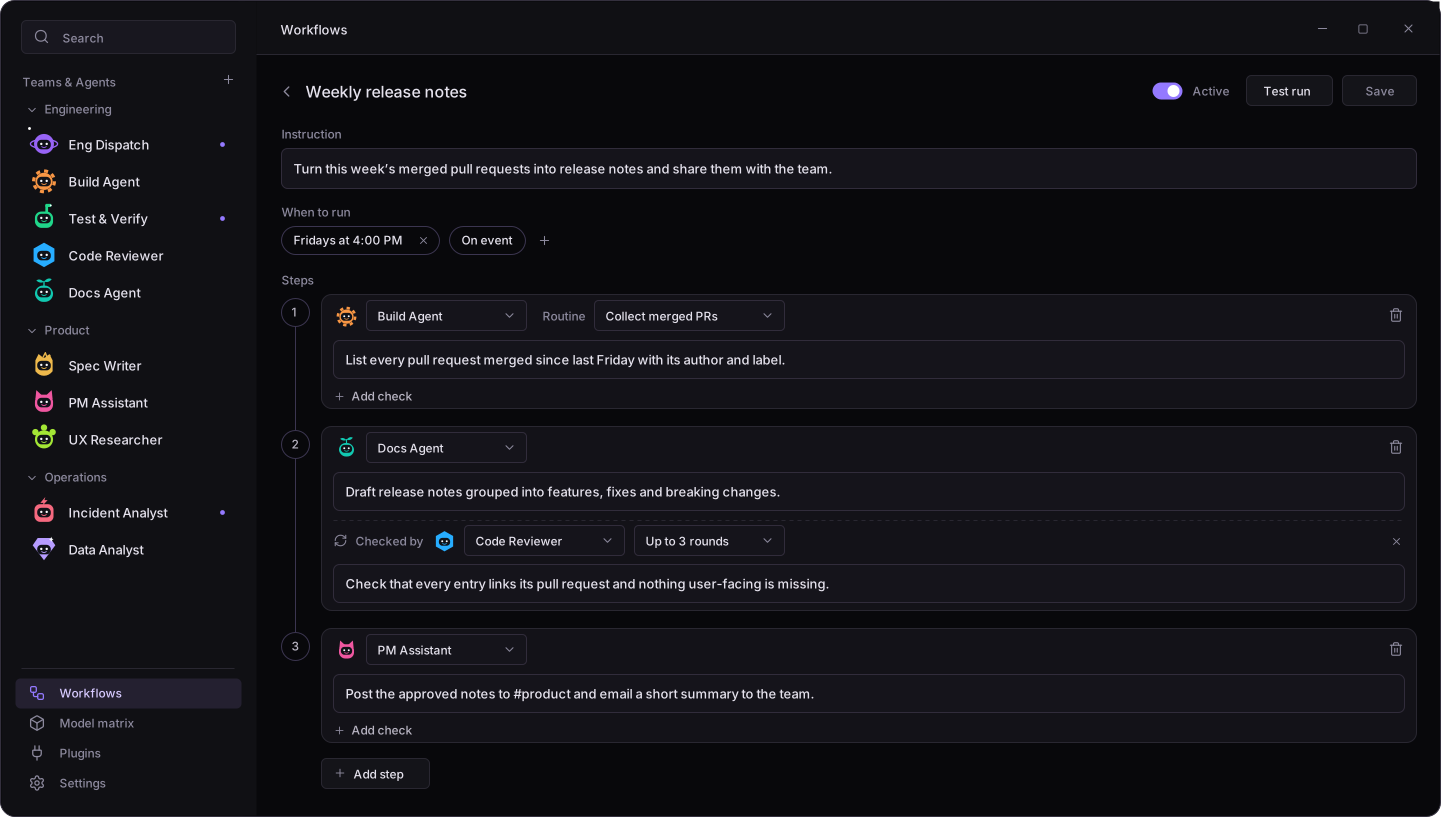
- You set the steps. Each step names an agent and gives it an instruction, or one of that agent’s routines.
- When a step finishes, the harness starts the next one and hands on the work. Files, screenshots, and documents move through a shared folder for the run.
- Any step can have a check: a second agent approves the work or sends it back with notes, for up to 5 rounds. Work that runs out of rounds is marked Not approved instead of being passed off as done.
- A step can need your approval. The run waits for you, then carries on when you approve it or send it back with notes.
- The result goes to the chat you choose, or to the last agent’s chat.
A workflow starts when you press Run, on a schedule, when a message arrives in a chat you pick, or when a connected service sends an event. You can build workflows on the Workflows page, or ask an agent to create or change one for you.
The same process, every run
A run follows the workflow exactly as it was when the run started, and edits apply from the next run. Workflows self-improve. Agents can save short notes about anything they had to work out, and later runs see those notes, so each run doesn’t relearn the same thing.
Run history shows each step, every check that sent work back, and each agent’s output. Set the reporting policy to Only report exceptions, and you hear about a run only when something needs your attention.
Why workflows beat self-directed agents
| What matters | Agents hand off on their own | Unbound workflow |
|---|---|---|
| Following the process | Each agent improvises the plan as it goes. | You define the process once, and Unbound enforces every step so your bots follow it. |
| Steps in order | Steps can be reordered, merged, or skipped. | Every step runs, in the order you set. None are skipped. |
| Quality review | Only if an agent decides to ask for one. | A named checker approves the work or sends it back with notes, on every run. |
| Human approval | Not guaranteed. The agent decides whether to stop and ask you. | Approval gates pause the run until you approve the work or send it back. |
| Consistent results | Results vary with how the agents plan that run. | The same steps, agents, and checks every run, improving with notes from past runs. |
Chat with an agent for one-off tasks and exploring. Use a workflow when a process repeats, has a set order, or needs a second pair of eyes.
Running Unbound on your own computer or server is free; your AI provider and hosting bill you separately. Download Unbound, read the FAQ, or see how Unbound compares with Muse, Dots, and Grok Bot.
Frequently asked questions
What is an AI agent workflow in Unbound?
A fixed line of steps, each done by an agent you choose. The harness starts each step when the previous one finishes and hands on its work, so the steps always run in the order you set. Steps can have a second agent check the work, or wait for your approval.
Why do AI agents skip steps when they hand off to each other?
When agents coordinate themselves, the plan lives inside the model’s reasoning. An agent can decide a step is done, skip a review nothing forces it to request, or never pass the work on. An Unbound workflow moves that decision out of the model: the harness runs every step you set, in order.
Can one AI agent check another agent’s work?
Yes. Add a check to any step and pick the checking agent. It approves the work or sends it back with notes, for up to 5 rounds. Work that runs out of rounds is marked Not approved in the result.
What happens if a workflow step gets stuck or fails?
Each step has 60 minutes of working time, not counting time spent waiting for you. A stuck, failed, or empty step stops the run, and the result chat gets the last good work along with which agent stopped and why.
Can a workflow run on a schedule or from an event?
Yes. A workflow can run on a schedule, when a message arrives in a chat you pick, or when a connected service sends an event. You can also run it yourself at any time. If your computer was off when a run was due, it runs once when Unbound starts again, as long as it was due within the last day.
When should I use a workflow instead of chatting with an agent?
Use a workflow when a process repeats, needs a set order, or needs reviews or approval gates. Chat works better for one-off tasks and exploring.